
• Skip to primary navigation
  • Skip to main content
BOSS Business Systems, Inc. – Copiers, Printers, IT Services and more

BOSS Business Systems, Inc. - Copiers, Printers, IT Services and more

An Office Technology Company

  • ABOUT US
    • PRO-TECH DEALER
  • COPIERS & PRINTERS
  • SERVICES
    • Cloud Consulting
      • Microsoft 365 & Azure – — Serving Stockton, Lodi, Modesto, Manteca & Turlock
    • Managed IT Services
    • Managed Print Services
    • Document Management
    • Customer Experience
    • Cradlepoint Micro Site
    • AI Consulting Services
  • CLIENT CENTER
    • BOSS Help Desk
  • EVENTS
  • NEWS
  • CONTACT
  • (209) 952-2677

dev_af2uw2

Konica Minolta announces Workplace Hub, the world’s most connected intelligent edge platform

April 4, 2017 by dev_af2uw2 Leave a Comment

BERLIN, Germany (24 March, 2017) – Konica Minolta, Inc. (Konica Minolta) has introduced Workplace Hub, an innovative new enterprise IT solution that unifies all of an organisation’s technology via a single centralised platform. Designed to future-proof workplaces of every size as they work towards digital transformation, version one of Workplace Hub, available from Autumn 2017, directly addresses growing IT complexity by providing more efficient and effective management of the disparate array of tools, services and devices used by modern organisations.

This new platform represents the next phase of Konica Minolta’s long history in innovation, marking its position in the IT services market and perfectly placing the firm to meet the evolving needs of business customers. Acting as a central hub that simplifies IT for an organisation, Workplace Hub drives efficiencies by reducing the overall costs of IT management and service provision, and providing real-time data-driven insights that help to improve business processes. By creating an ecosystem to manage and coordinate the entire IT infrastructure and services across existing and future IT systems, devices and services, Workplace Hub provides users with a central dashboard showing 360-degree visibility of IT usage patterns across the whole business, allowing for simple management and optimisation of systems.

Moreover, the platform’s product roadmap includes future integration of IoT, Artificial Intelligence, Intelligent Edge and Decision Support capabilities as they become more central to the business environment of tomorrow. Adding this cognitive layer of organisational insight unleashes an intuitive understanding of the world that empowers people to collaborate better and to make smarter, data-driven decisions more effectively and easily.

Global partnerships with Hewlett Packard Enterprise, Sophos and Microsoft deliver best in class hardware, security and IT solutions. Additional services from Canonical and BrainTribe bring the power of open source and advanced data management, helping to facilitate effective digital transformation for any business.

Dennis Curry, a Vice President and Director of Business Innovation and R&D at Konica Minolta, said “Workplace Hub will evolve to become the most comprehensive platform for the services and capabilities demanded by the workplace of the future. It means businesses can grow and manage their IT in tandem with changing business needs. It simplifies IT operations today and paves the way for exciting new integrations, such as AI and intelligent edge computing, to become a central part of the digital organisation of the future.”

This strategic shift will allow Konica Minolta to deliver more comprehensive digital transformation solutions, while continuing its heritage of providing the very best products and services for the business market as a whole.

“The workplace is evolving at an unparalleled rate and digital transformation is becoming increasingly important to both survival and future prosperity,” said Shoei Yamana, CEO and President of Konica Minolta Inc. “Workplace Hub not only allows businesses of all sizes to achieve effective transformation, but future-proof themselves against the next wave of technology innovations already infiltrating the business environment.”

Workplace Hub version one will be available from Autumn 2017 to organisations looking for enterprise quality managed services at an affordable price.
Filed Under: Events

BOSS Business Systems Volunteers for 2017 h2o Hackathon

March 25, 2017 by dev_af2uw2 Leave a Comment

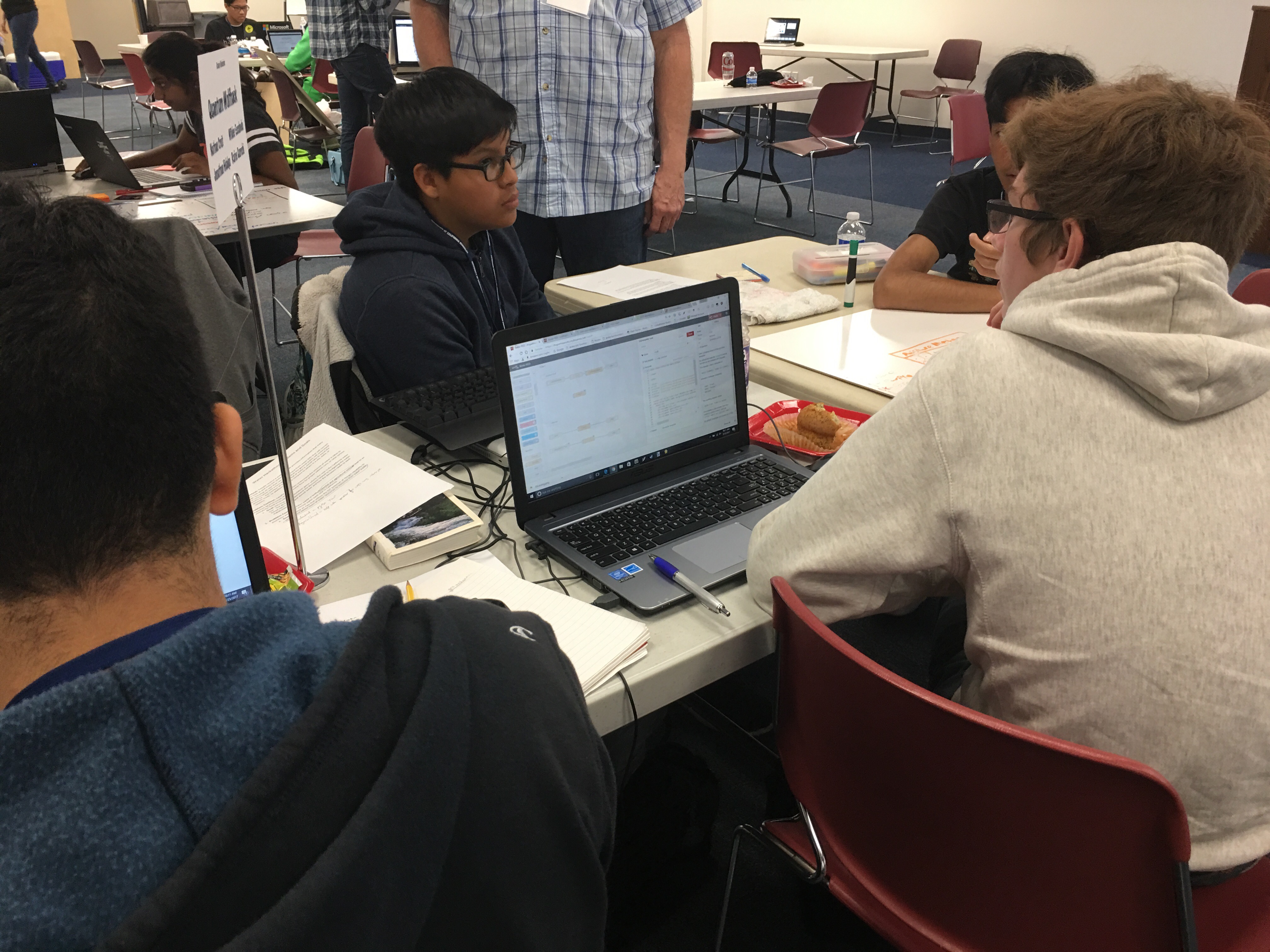
The 2017 h2o Hackathon got underway at 8 AM on 24 March 2017 at the San Joaquin Office of Education in Stockton, CA.   BOSS has volunteered for the last 2 years to support this effort to bring technology to the local area and into our schools.  Over 100 students turned out to develop their application to help improve the accountability of water use in California while also learning about this important topic.

IBM Bluemix was a main sponsor of the event and the application solutions were built primarily on their cloud platform.  The students competed for a 5k grand prize for the best application.  Also in attendance were major industry water experts from all over California.   BOSS with its partner company Media Creations created t-shirts, printed material and the Hackathon website to help promote this successful event.

Filed Under: Events

Getting correct color clicks from your bizhub or any color printer

July 13, 2016 by dev_af2uw2 Leave a Comment

Have you ever printed black and white and color pages from word and all of them Unknowncome out as color clicks?  Here is a simple way to handle this problem.

We occasionally receive calls from our customers that they have run a multiple page document from MS Word and are expecting it to click color pages as color, and black and white pages as black and white.

First off, many softwares deal with black and white as what is called “CMYK Black”.  This is mixing all four colors to make black.  When the copier receives this information from your computer program it then “clicks” you for a color page even though it looks black and white on your screen.  This also applies to Adobe Indesign and many other programs.  For example if you add a drop shadow to black and white text in Indesign it converts the page to CMYK Black.

Realize that there is nothing wrong with the machine.  It will correctly “click” what it is sent to it.  If your program sends CMYK Black you will be “clicked” for color as it has used all 4 colors to make your print.

How to solve this problem:

  1.  Export your multi-page mixed document to a PDF Document from MS Word.  Usually this is a “print to pdf” function in word.
  2.  Open your exported PDF in Acrobat Pro.  You can get your free trail by clicking here.
  3.  Go to tools > production print > convert colors
  4.  Select the page range which you would like to convert to black and white.  Located at the bottom of the screen.
  5.  Then towards the upper right side select under  “Conversion Attributes” select the drop down “conversion profile” and select one of the gray gamma selections ( gray gamma 2).
  6. Click OK.  It let you know that the conversion cannot be undone.  Tell it to proceed.
  7. You can now print your document from Acrobat and it will click correctly on your bizhub or desktop color printer.


Filed Under: How To, Uncategorized Tagged With: bizhub, color clicks, printing

2016 Spring Lunch & Learn at BOSS

May 6, 2016 by dev_af2uw2 Leave a Comment

Eventbrite - BOSS Lunch & Learn

Get your questions answered with hands-on training from our top technical and sales staff

Get an overview of bizhub functions you may not know you have

Learn how to customize complex job set-ups for fast printing

Find out about new technologies to make life easier in the workplace

See the latest offerings

And most of all, enjoy great food and meet new people!

Filed Under: Events, Uncategorized

Custom Label Printing – On Demand

February 18, 2016 by dev_af2uw2 Leave a Comment

High-Definition Digital Label Printer and Finishing System
Introducing Muratec Precision Label Series

Muratec’s Precision Label Series (Label Printer) gives manufacturers, marketers, private labelers and professional print shops the ability to produce high quality labels, on-demand. Muratec’s PLS-2112 Label Printer is a compact digital label system that can print continuous-fed media or cut sheets, up to 8.5″ widths, on a variety of media stocks. This system features a high-performance, easy-to-use Wasatch RIP that guides users step-by-step through job set-up and execution. Professional print shops and label converters benefit from Muratec’s PLS-2112 digital label system by taking on jobs that previously would not be feasible or profitable on a high-speed flexo press; pecifically, short-run jobs (fewer than 5,000 labels) that include variable data, sizes and colors. Businesses who rely on labels use Muratec’s PLS-2112 to bring label printing in-house and significantly reduce their label spend, waste and production time. Imagine, instead of waiting weeks to receive a label order, you can print, laminate, die-cut and have your labels ready for application in just hours. Muratec’s PLS-2112 digital printing system can also have a dramatic cash flow effect, not only by saving potentially thousands of dollars per year in reduced label costs, but also by freeing up cash typically absorbed by label inventory that may get discarded. The PLS-2112 gives you the ability to:

  • Instantly give your logo, packaging and brand a completely new look.
  • Print 500 labels, instead of 50,000, which frees up cash, reduces waste and eliminates an inventory nightmare.
  • Print pre die-cut materials that are ready for immediate application, or, with the PLS-2112F digital finishing system, you can create unique, specialty die-cut labels without additional set-up charges or long lead times from your provider.
  • Easily create labels for focus group prototype packaging, create an identity for sub-brands or third-party distributors, add die-cut corporate logos to promotional products and more.

Download Brochure

Label Printer - Custom Labels

Filed Under: Uncategorized

Reduce Paper Jams with Proper Paper

December 15, 2015 by dev_af2uw2 Leave a Comment

THE HIGH COST OF LOW COST PAPER

There are many types of paper in the market place that you can choose from.  Does buying the cheapest paper actually save you money in the long run?  Many times cheaper quality (and cost) paper will cause more jams, more downtime, waste more paper and more employee labor than you save as compared to higher quality paper.

Every machine is designed with different factors in mind.  These factors will influence what type of paper you can effectively use in your Konica Minolta machine.  Konica Minolta publishes paper guides for each model with a list of tested brands that have been proven to work properly in your equipment.

Current Media Guide

OTHER HELPFUL TIPS

• DO NOT cut your own paper.  It leaves burrs that cause jams and many times is not cut to the exact intended size.

• Ensure that your paper grain direction is going in the proper direction.  This can make a huge difference in decreasing jams as well as the paper breaking while folding.

• DO NOT store your paper in an open package as this makes it far more susceptible to moisture and the elements.  It can also get dusty as well as folded or bent.  In addition, when you are getting paper that is curling when it exits the machine in most cases it is caused by damp paper or paper not made to run in your machine.

• Make sure you have selected the proper paper weight settings for the thickness of your paper on your machine.  This is a very common reason for jams that we find when servicing copiers.

• Make sure that you are not running too heavy of paper that is outside the specs of your particular machine.

• If you must feed thick paper or thin paper, use the paper path the has the least amount of turns.  Many times this will be the bypass tray or the manual paper tray on the right side of the machine.

So save yourself some money and time and purchase quality approved paper for you Konica Minolta Copier.

If you have any questions about this you can contact your service technician at (209) 952-2677 or [email protected]

Filed Under: Uncategorized

  • « Go to Previous Page
  • Page 1
  • Interim pages omitted …
  • Page 4
  • Page 5
  • Page 6
  • Page 7
  • Page 8
  • Interim pages omitted …
  • Page 12
  • Go to Next Page »

Copyright BOSS Business Systems, Inc. All rights reserved.

  • Place Service Call
  • Order Supplies
  • Report Your Meter
Manage Cookie Consent
To provide the best experiences, we use technologies like cookies to store and/or access device information. Consenting to these technologies will allow us to process data such as browsing behavior or unique IDs on this site. Not consenting or withdrawing consent, may adversely affect certain features and functions.
Functional Always active
The technical storage or access is strictly necessary for the legitimate purpose of enabling the use of a specific service explicitly requested by the subscriber or user, or for the sole purpose of carrying out the transmission of a communication over an electronic communications network.
Preferences
The technical storage or access is necessary for the legitimate purpose of storing preferences that are not requested by the subscriber or user.
Statistics
The technical storage or access that is used exclusively for statistical purposes. The technical storage or access that is used exclusively for anonymous statistical purposes. Without a subpoena, voluntary compliance on the part of your Internet Service Provider, or additional records from a third party, information stored or retrieved for this purpose alone cannot usually be used to identify you.
Marketing
The technical storage or access is required to create user profiles to send advertising, or to track the user on a website or across several websites for similar marketing purposes.
  • Manage options
  • Manage services
  • Manage {vendor_count} vendors
  • Read more about these purposes
View preferences
  • {title}
  • {title}
  • {title}